contact: hello@atouchysubject.com
If you've forgotten your password, don't worry, it happens to all of us!
Simply go to this link and follow the instructions to reset it:
Learn more about the Hub here.
The Hub membership is a private community with over 500 men from all over the world navigating sexual recovery post prostate treatment.
The membership includes access to 24/7 moderated forum, monthly expert webinars, monthly group sessions, all our online courses, and the occasional group challenge!
You can skip straight to checkout to join for $20 USD per month or $199 USD per year (note: charge is in USA Dollars and equivalent to roughly ~$30 AUD /month and ~$305 AUD/year).
When you've joined the Hub, you can access the membership by logging in, you'll be taken to the Home screen showing the forum and links to webinars and online courses.
You are automatically debited either monthly or annually, whichever you chose at checkout.
From the home feed, click the site name: 'A Touchy Subject' (top left-hand side on desktops) and select Billing.
On the Billing page, find the Subscriptions section.
Click the … menu next to the subscription.
Select Cancel subscription.
Confirm the cancellation.
How long do you have access after cancelling?
Your access continues until the end of the period you’ve paid for. After that, your membership simply ends, there are no refunds or credits for any unused time.
How to Change Plan to Monthly/Yearly:
Go to Settings, and scroll down to the 'Billing' section.
Next to 'Community', it will tell you the plan you are on. Click the 'Edit' button.
Click 'Cancel plan' button.
NOTE: If you're unable to change your membership plan, it may be due to a missing "official" payment method on file. This often happens when 'Stripe Link' is used, but the system currently only recognizes card payments. We are working to resolve this inconsistency. In the meantime, you can fix the issue by adding a card to your account.
To do this, go to Settings, scroll down to 'Billing', and click 'Edit' next to the 'Payment Method' field. Once you've added a card, you should be able to change your plan.
If you upgrade to an annual membership:
This will happen immediately, and you’ll be charged right away. Any unused time from your current month is automatically applied as a discount to your annual payment, so you’re not paying twice.
If you downgrade (e.g., from annual to monthly):
Any unused value from your original (more expensive) plan becomes a credit.
This credit can only be used for future subscription payments (not for other products or courses).
The credit is automatically applied to your upcoming invoices until it runs out.
When you join the Hub, you are automatically added to all 'Spaces'. Each Space is for a topic within the forum.
You can easily unfollow spaces and change your email notification settings through the 'browse' button.
You're welcome to use the Forum anonymously to post, and it's easy to do so.
Head to Settings and click 'Edit' next to 'Profile'.
This is also where you can change your photo and bio.
If you'd prefer to use your name but occasionally want to post something anonymously, you can submit your question/post via this form, and Victoria will post on your behalf.
Watch our instructional video to learn how to interact in the Hub.
Every webinar is available to join live, and the registration link is available 2 weeks before the webinar. You can also find the Zoom link on the announcement post.
Every course is made up of lessons. You can work through them in order, or jump straight to the one you need.
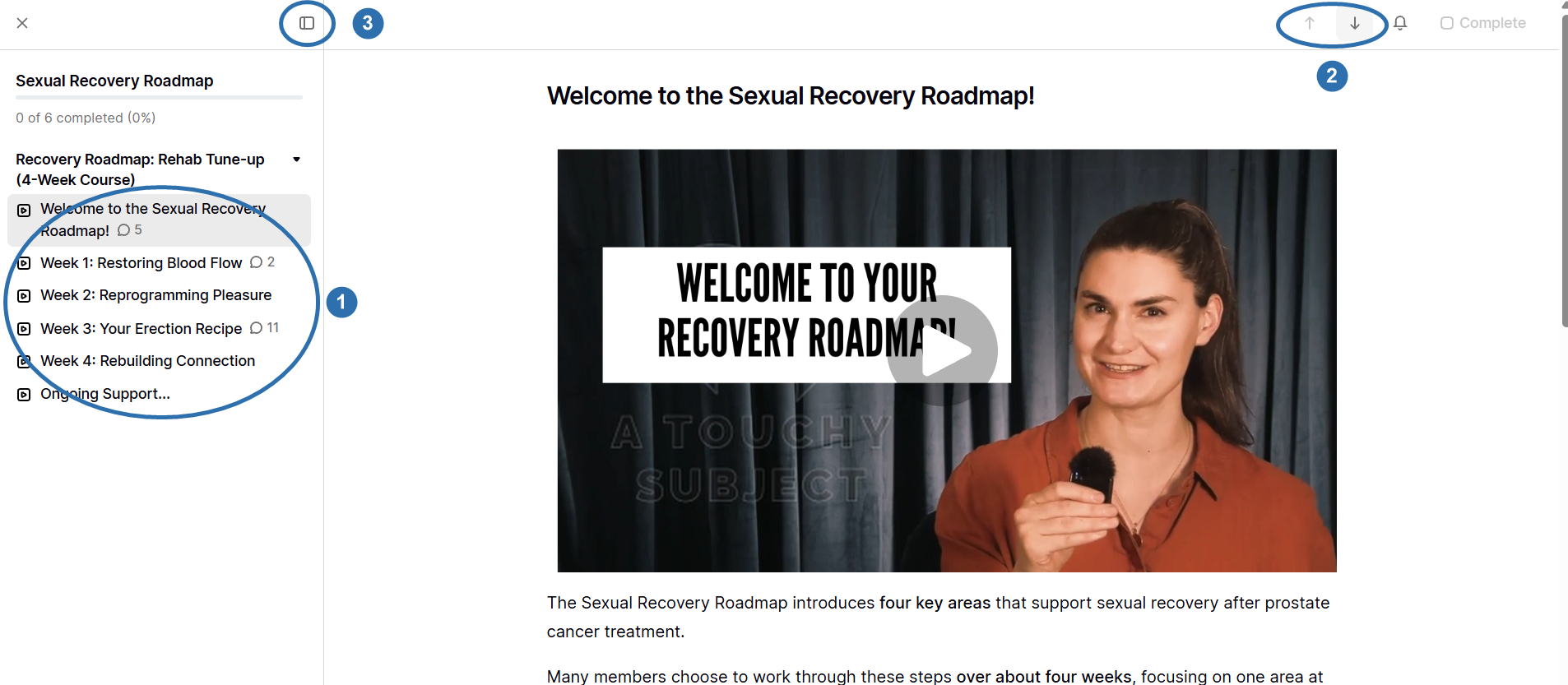
On a computer
The lesson list runs down the left-hand side. Click any lesson to open it.
The up and down arrows at the top right take you to the previous or next lesson.
The panel button above the lesson list hides it, which gives you more room to read. Click it again to bring the list back.
On a phone or tablet
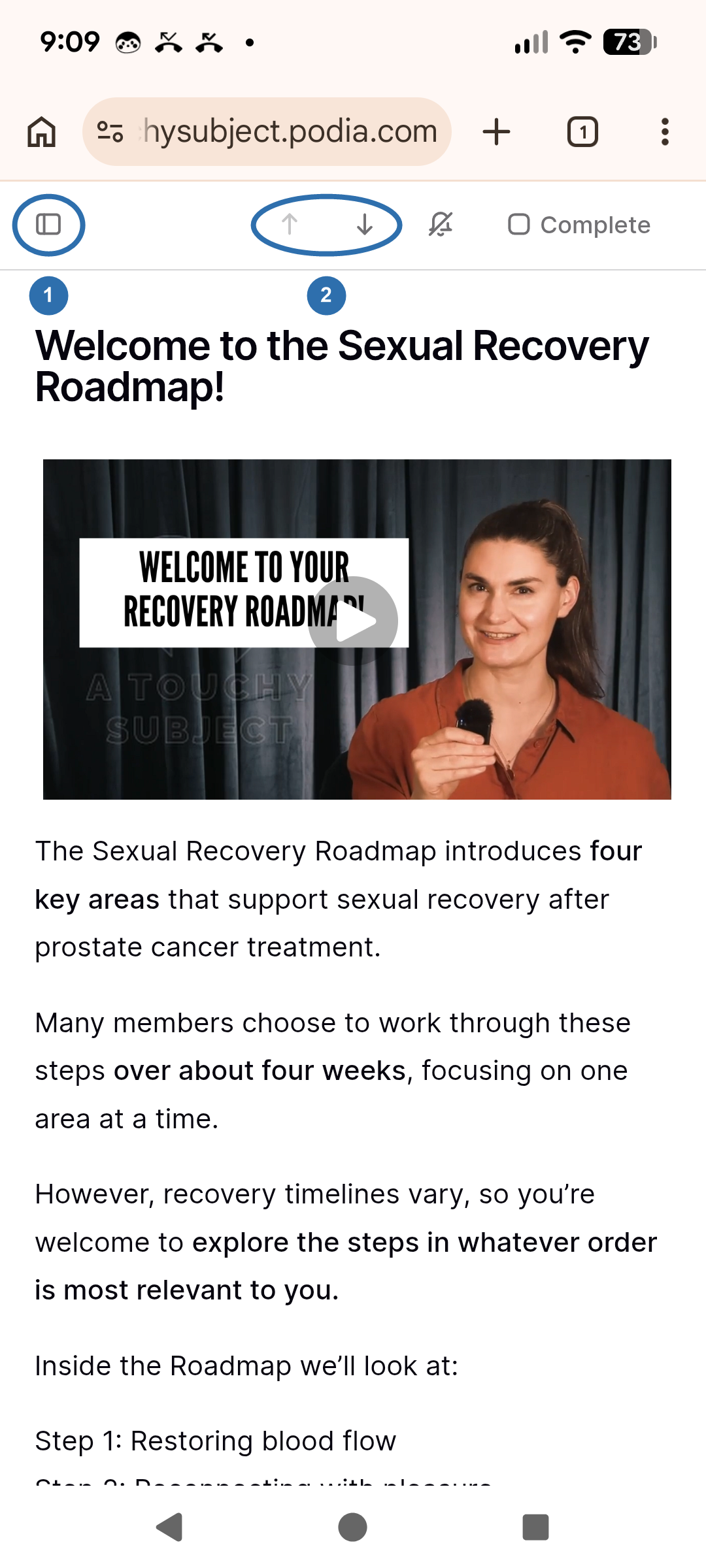
The lesson list is tucked out of sight to save room on a small screen, so if you have been hunting for it, that is why.
The panel button at the top left opens the lesson list. Tap any lesson to open it.
The up and down arrows on the same row take you to the previous or next lesson.
Marking a lesson as done
Tap Complete at the top right when you have finished a lesson. Your progress shows at the top of the lesson list, for example "2 of 6 completed".
please reach out to our community manager, Steve Jones, for further support if needed:
steve@atouchysubject.com